Business and service websites, landing pages and content-led sites
that explain what you offer and make it easy to enquire.
Structure and content
Plan the pages and navigation, write initial copy and source
appropriately licensed images. You review the content for
accuracy.
Design and usability
Design for phones, tablets and desktops, with readable layouts,
keyboard access and clear navigation.
Enquiries and editing
Build contact forms and agree which pages, images and other
content you need to update yourself.
Search and performance
Set up page titles, descriptions, sitemap and indexing controls,
and check loading performance. Search rankings are not
guaranteed.
Customer Portals
Give customers access to their requests, documents, invoices and
account information without handling every update by email.
Customer accounts, memberships, account-specific inventory,
invoice payments, support tickets and outstanding actions.
Internal Business Systems
Give staff one place to manage jobs, customer records, stock,
schedules and outstanding work.
Searchable records, assignments, permissions, document history and
reporting dashboards for employees and managers.
Custom Tools & Workflows
Build tools for tasks that need your own rules: availability-based
booking, quotation building, made-to-measure ordering and product
configuration.
Validate choices, calculate prices or materials, generate
documents and pass the results into the next step of the work.
E-commerce
Online stores with product catalogues, shopping carts and
checkout, connected to stock and order management.
Product options, customer accounts, payment-provider integration,
delivery or collection choices, and tools for staff to manage
orders.
Examples & solutions
Try a workflow and see what reaches the customer, employee or
administrator.
These interactive examples use fictional data.
Interactive examples require JavaScript.
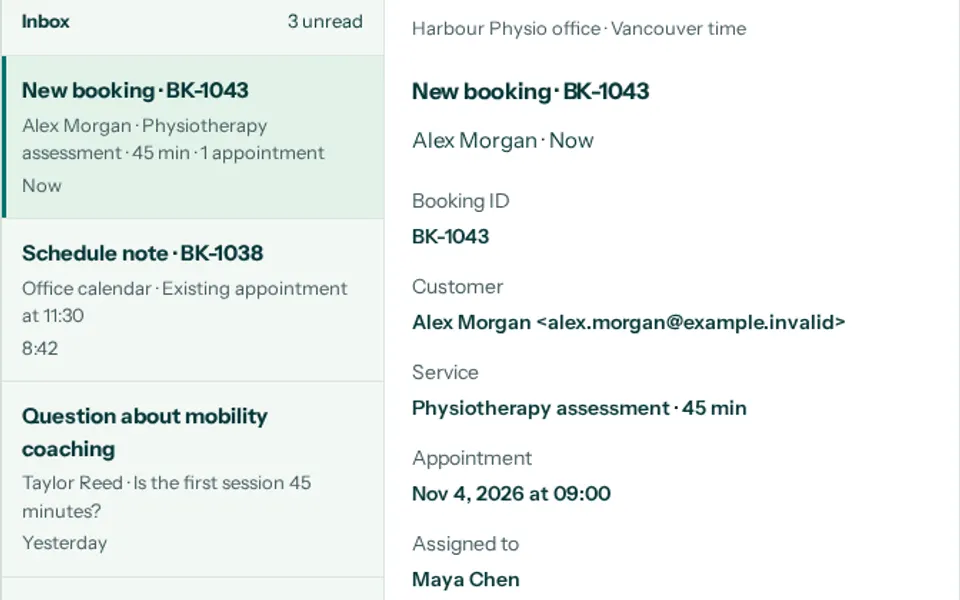
Online booking
Select an appointment or several sessions. See the booking reach
the office inbox, appear in the staff calendar and update
availability.
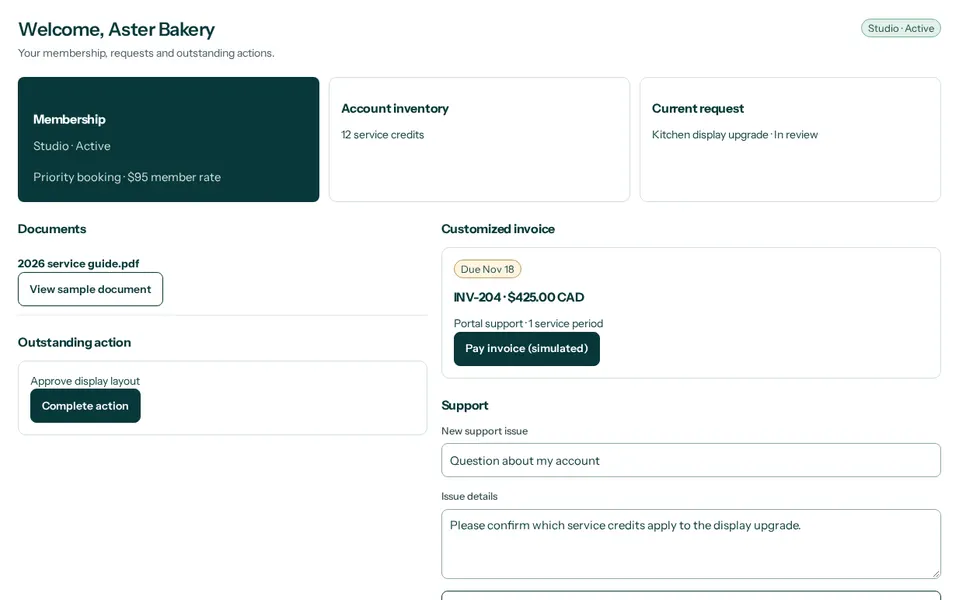
Customer self-service
Check account details, view documents, complete an outstanding
action, pay a sample invoice and submit a support request. See
the corresponding staff view.
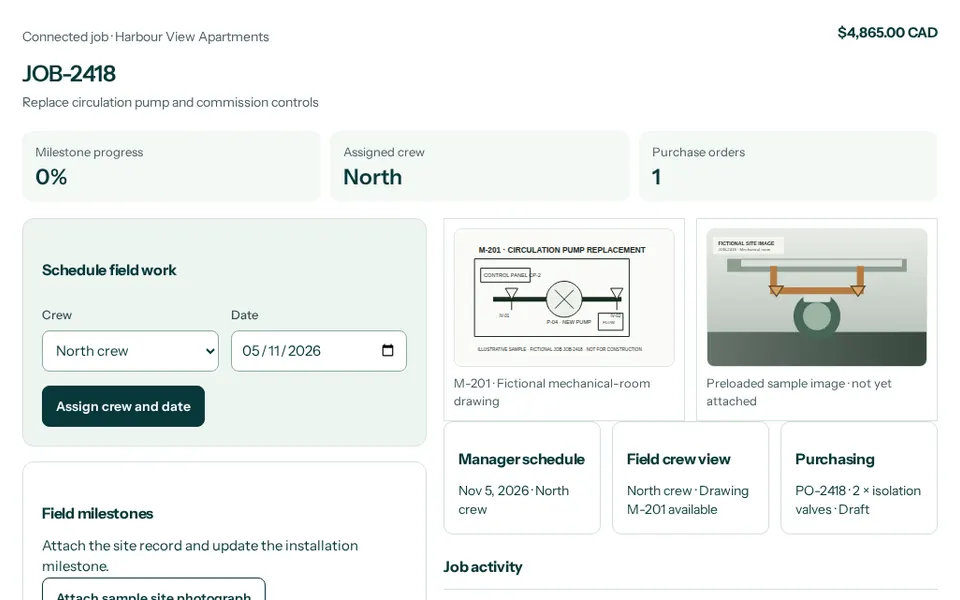
Contractor job management
Turn a quotation into a job, assign a crew, add site information
and create a purchasing request. Keep the work connected to the
same job record.
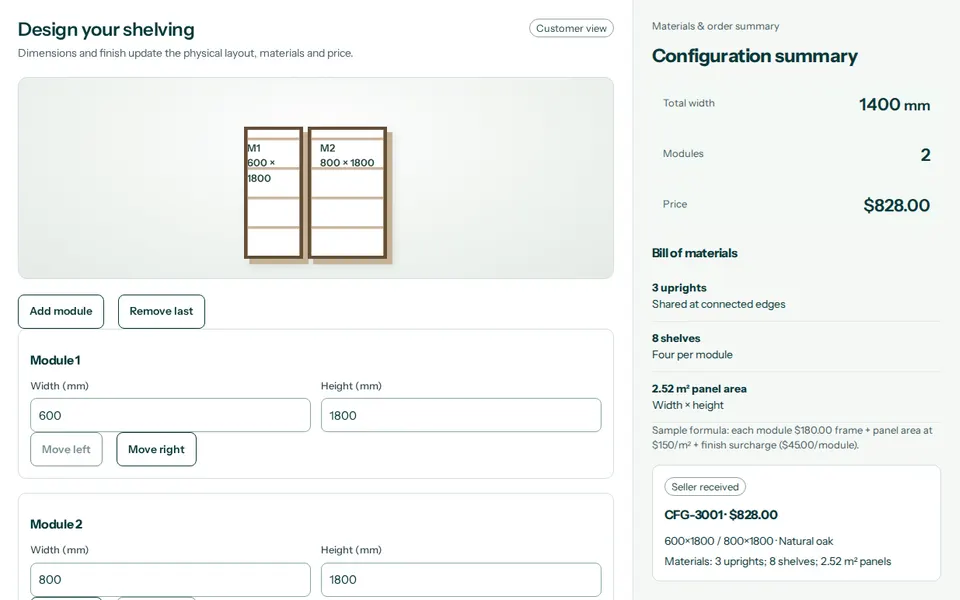
Made-to-measure ordering
Change dimensions and materials, see the price update and create
a sample order with the configuration and material requirements
attached.
The scope covers what visitors can do, what staff need to manage and
what happens to the information they submit.
Customer-facing pages
Visitors browse, enquire, book or order. Where accounts are
needed, each customer can access the information and actions
intended for them.
Staff workspace
Staff review incoming work, update records and manage tasks.
Permissions define who can see or change information, and
dashboards show the relevant activity.
Data and connections
Records can connect with payment providers, accounting tools,
email, SMS and other services. We check the available integrations
before committing to a workflow.
A business website may need only public pages, an enquiry form and
content editing. Additional functions are scoped when the business
needs them.
Project delivery
From requirements to launch
Scope and estimate
We work through your users, pages, content, workflows and existing
systems. The proposal sets out deliverables, exclusions, client
input, milestones and the estimate.
Design and review
You review the page structure, visual design and key screens
before they are built. For websites, we also prepare the initial
copy and identify any images or information needed from you.
Build and test
You review working functionality in agreed stages. We check forms,
permissions, important workflows, screen sizes and the agreed
browsers. Changes to scope and their cost are agreed before
additional work proceeds.
Launch and handover
The finished work is deployed into client-owned accounts. Handover
covers the agreed code, access, documentation and instructions for
routine administration.
Ownership, maintenance & costs
How is the price determined?
The estimate depends on design and content work, the complexity of
the workflows, integrations and any data migration. It identifies
what is included and separates development from hosting, licences,
payment-provider fees and ongoing support.
When will it be ready?
The schedule is set after the scope is understood. Review dates,
client inputs and dependencies are included so delays and proposed
changes can be discussed early.
What will I own and control?
You control your domain and production accounts. The agreement
defines source-code rights, third-party licences, access and
handover materials. Data export and transfer requirements are
agreed before development.
Can I update it myself?
We agree which content and records you need to manage, then
provide the relevant editing tools and instructions. New features
or design changes may still require development.
What happens after launch?
The agreement distinguishes correcting defects in delivered work
from maintenance and new features. Responsibility for hosting,
updates, backups and support—and any recurring costs—is agreed
before launch.
Discuss a project
Tell us about your business, who will use the website or
application, and what needs to work better. Include an existing
website or important deadline where relevant. A technical
specification is not required.
A service business spends time checking appointment
availability, answering booking requests and confirming
appointments. Customers may also want to purchase several
sessions at once instead of repeating the booking and checkout
process.
Solution
Let customers book available appointments or session packages
online. Confirm their selections, update staff calendars,
notify the business and prepare appointment reminders
automatically.
Problem
Customers repeatedly contact staff to check request status,
obtain documents, manage memberships, view account-specific
inventory, pay tailored invoices or raise support issues.
Solution
Give each customer a secure, account-specific self-service
experience while employees manage memberships, outstanding
actions, invoices and support centrally.
Problem
A mechanical contractor keeps quotations, job numbers, crew
assignments, calendars, drawings, site photographs and
purchase orders in separate places, making it difficult to see
the full state of a job.
Solution
Connect estimating, scheduling, project documents, purchasing
and field progress to a single job record that office and site
staff can use.
Problem
Customers ordering modular or made-to-measure products need to
choose layouts and dimensions, while the seller must validate
combinations, calculate materials, set an accurate price and
prepare the order for Shopify.
Solution
Provide a visual product configurator that validates choices,
calculates material quantities and prices, and transfers a
complete, structured configuration into the order workflow.