The screens, permissions and device features depend on who will use
the app and what they need to do.
Customer Applications
Give customers access to appointments, orders and account
information from their phones, without requiring staff to handle
every routine update.
Booking and ordering
Appointments, session packages, repeat orders and relevant
checkout steps.
Account access
Membership details, documents, requests and order or service
status.
Updates
Relevant notifications about confirmations, changes and
outstanding actions.
Business connection
Customer actions appear in the appropriate office system, with
account permissions in place.
Employee & Field Applications
Put assignments, job instructions and progress updates where the
work happens, rather than only on an office computer.
Daily schedules, checklists, site notes, photographs, task
completion and updates visible to managers.
Warehouse & Scanning Applications
Support stock handling and dispatch with mobile scanning, quantity
checks and records made at the point of work.
Barcode or QR-code capture, lot and pallet checks, inventory
movements, dispatch photographs and traceability records. Scanner
compatibility is assessed for the intended devices.
Connected Device Applications
Give operators a mobile view of compatible equipment, readings,
status and permitted controls.
Device status, alerts, settings and diagnostics. Hardware
protocols, remote commands and safety requirements are assessed
separately from the mobile interface.
Examples & solutions
Try the customer and field workflows, then see how the resulting
information reaches the business.
These are browser-based simulations using fictional data, not
published mobile apps.
Interactive examples require JavaScript.
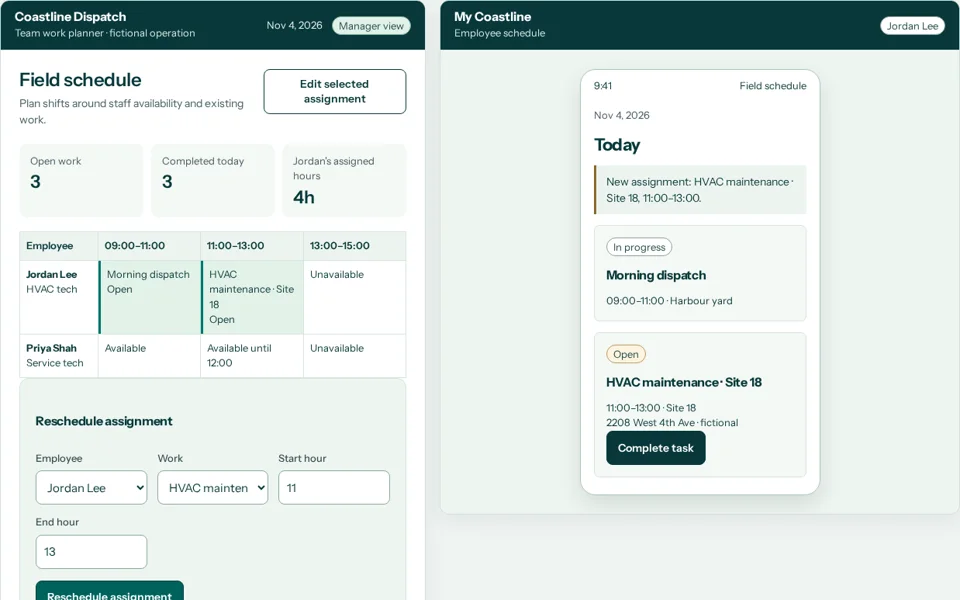
Employee scheduling
Assign work in the manager's schedule. The change appears in the
employee's mobile view; completing the task updates the office
record.
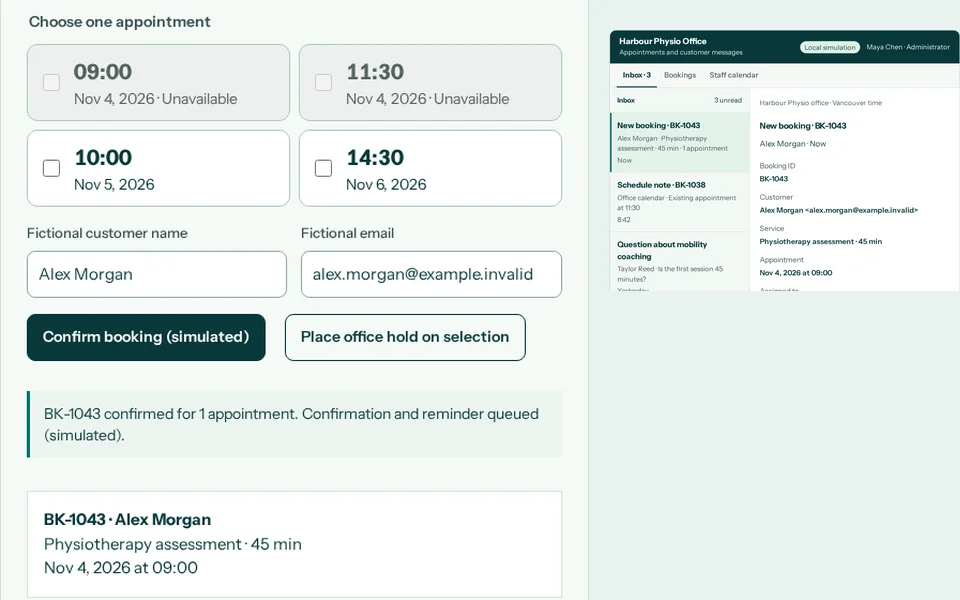
Customer booking
Choose an appointment and confirm a booking. See the office
receive the details, update its calendar and remove the booked
time from availability.
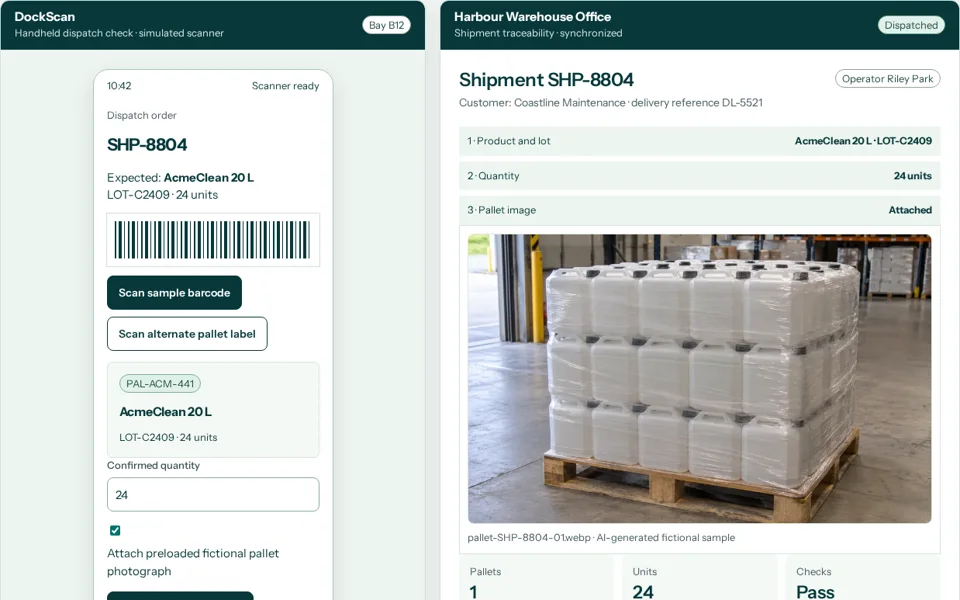
Barcode & dispatch checks
Scan a sample pallet, verify its product, lot and quantity,
attach a fictional dispatch image and see the shipment record
update for office staff.
A mobile app is only part of the system. The device, the business data
and the way the app is distributed all need to be planned together.
On the device
Screens are designed for the tasks users perform on a phone or
tablet. Camera access, notifications, location or connected
equipment are included only when the app needs them and the device
supports them.
Connected to business records
Appointments, assignments, inventory and customer information can
be shared with an existing system or a new backend. Access rules
determine what each user can see or change.
When connectivity is unreliable
Field work may require access to saved information or the ability
to record changes without a connection. If offline work is needed,
the project defines what is stored, how changes are synchronized
and how conflicts are handled.
Android, iOS and distribution
We agree which devices and platforms the app must support and
whether it is intended for public app stores or controlled
internal distribution. App-store accounts, review requirements and
release responsibilities are part of the plan.
A shared implementation may be appropriate for both platforms, but
each supported platform still needs its own testing.
Project delivery
From requirements to release
Define the users and scope
We identify who will use the app, the devices they have, the main
tasks, required data and existing systems. The proposal covers
deliverables, platforms, exclusions, milestones and the estimate.
Design the screens and workflows
We prepare the navigation and key screens, including permissions,
errors and important tasks. You review the design and the expected
behaviour before implementation proceeds.
Build and test
Development covers the agreed app features and integrations. We
test the main workflows on the supported devices, including
connection loss, notifications or scanning where these are in
scope.
Release and handover
We prepare the agreed distribution route and hand over the
contracted code, access and documentation. Store review and
approval are controlled by the platform provider, not by GeeGems.
Ownership, maintenance & costs
Do we need both Android and iOS?
Not always. The choice depends on the people using the app, their
devices and how it will be distributed. We establish the required
platforms before estimating the work.
Can it work without internet access?
Where necessary, we can plan offline viewing or data entry. What
can work offline, how long information can remain stored and how
changes are synchronized must be defined for the specific
workflow.
Can it connect to our existing software?
Often, provided the existing system offers suitable access to its
data or APIs. We check the available interfaces and permissions
before including an integration in the scope.
What affects the cost?
Platform support, screens, business rules, device features,
integrations, backend work and testing determine the estimate.
Development is separated from store accounts, hosting,
external-service fees and ongoing maintenance.
How long will development take?
The schedule depends on the agreed functionality, available
systems and review stages. A project plan should identify
dependencies, client inputs and checkpoints before dates are
committed.
Who controls the app after release?
The client should control production and distribution accounts.
The agreement specifies source-code rights, third-party licences,
access, updates, maintenance and handover requirements before work
begins.
Discuss a project
Tell us who will use the app, what they need to do, which devices
they have and whether it must connect to an existing system. You do
not need a technical specification.
Managers coordinate shifts, employee availability, assignments
and deadlines across spreadsheets, calendars and messages.
Changes are easily missed, and overlapping assignments create
operational problems.
Solution
Manage schedules and tasks together, check staff availability,
notify employees of changes and give managers an up-to-date
view of assignments and progress.
Problem
A service business spends time checking appointment
availability, answering booking requests and confirming
appointments. Customers may also want to purchase several
sessions at once instead of repeating the booking and checkout
process.
Solution
Let customers book available appointments or session packages
online. Confirm their selections, update staff calendars,
notify the business and prepare appointment reminders
automatically.
Problem
A chemical warehouse must identify which lots were dispatched,
when and in which quantities, and retain pallet photographs
when a customer disputes a delivery.
Solution
Capture barcode scans, product and lot identities, dispatch
checks, photographs and timestamps so each shipment has a
traceable record and a usable evidence report.